Use a sales decision tree to standardise how reps respond to objections and cut the number of deals that quietly slip after a stage change. A decision tree maps every branch point in a sale, price pushback, competitor mentions, timing stalls, into a fixed set of questions, responses and next steps. The payoff is fewer subjective calls, a pipeline you can defend in a forecast review, and templates your team can start using this week.
TL;DR:
- A sales decision tree standardizes objection responses, reducing subjective variability and helping reps make consistent, measurable decisions during sales conversations.
- Mapping a tree involves choosing a clear, binary root question linked to a tracked metric, then branching into specific objections with scripted responses and assigned ownership.
- Incorporating CRM enforcement, automation, and regular review ensures the tree remains practical, trusted, and aligned with real call behavior over time.
- Using simple tools like spreadsheets or flowcharting software is sufficient for initial implementation before investing in dedicated systems.
- Decision trees are most effective in complex, multi-stakeholder sales environments with recurring objections; they are less suited for straightforward, short-cycle transactions.
Table of Contents
- What is a sales decision tree and how does it work?
- How do you map a sales conversation into decision nodes?
- Ready templates for price, fit, competitor and timing objections
- How to build a sales decision tree step by step
- Integrating the tree with your CRM and measuring impact
- Common pitfalls when implementing sales decision trees
- Case studies: decision trees across different sales environments
- Which tools work best for building a sales decision tree?
- How do you train reps to use a decision tree in real conversations?
- When decision trees are worth the investment
- Turning objection logic into a forecast you can defend
- Sources
- FAQ
What is a sales decision tree and how does it work?
A sales decision tree is built from three node types, borrowed from standard decision-tree theory but applied to a live sales conversation. A decision node is a point where the rep chooses an action: which question to ask, which objection response to give. A chance node represents something outside the rep’s control: whether the prospect has budget authority, whether the competitor evaluation is real or a negotiating tactic. A leaf node is the outcome: qualified, disqualified, escalated, or closed.
The value of this structure is not conceptual. It changes rep behaviour. Two reps facing the same price objection today might give two different answers, one discounts immediately, one holds the line badly. A tree removes that variance because the response is defined in advance. This is the same logic used in business decision trees generally: map the choice, map the probable outcomes, and let the structure do the deciding rather than individual judgement in the moment.
A tree also connects naturally to your existing sales process flowchart. Where a flowchart shows stages (discovery, demo, proposal, close), a decision tree shows what happens inside each stage when the conversation branches:
- Which questions determine whether a deal advances or stalls
- Which objections trigger a specific, pre-approved response
- Which exit criteria must be true before a rep is allowed to move a deal forward
How do you map a sales conversation into decision nodes?
Start with the root question. This is the single most important choice in the whole exercise, and most teams get it wrong by picking something vague like “is this a good deal?” instead of something measurable, such as “does the prospect have budget approved for this fiscal quarter?” A good root question is binary or near-binary and tied to a metric you already track in Salesforce.
From there, the mapping follows a fixed sequence:
- Define the root and its success metric. Pick the one question that most changes the probability of a close, and tie it to a field you can measure.
- List the probe questions that reveal the answer. For a budget root question, that might be “who signs off on spend over £10,000?”
- Branch each answer into an objection or next step. No budget yet becomes a timing branch. Budget confirmed becomes a fit or competitor branch.
- Assign an owner and exit criteria to every node. A branch with no named owner is where deals go to die quietly.
Pro Tip: Limit each decision node to no more than three branches. A tree with five or six options per node collapses into the same ambiguity you were trying to remove, and reps stop using it within a month.
Ready templates for price, fit, competitor and timing objections
Objection handling improves when the response is scripted in advance rather than improvised, and decision-tree logic applied to objections turns a pushback into a structured next step instead of a dead end. Four objection types cover most of what reps hear in mid-market B2B sales, and each deserves its own branch.
- Price: Probe for the actual concern (budget, ROI doubt, or negotiating tactic), reframe around measurable value, then offer a conditional close or a scoped pilot rather than an immediate discount.
- Fit: Ask specific use-case questions to isolate the real gap, then respond with evidence, a customer example or a technical answer matched to that exact use case, not a generic pitch.
- Competitor: Ask what criteria the prospect is using to compare vendors, surface your genuine differentiators against those criteria, and log the objection in the CRM so the next rep has the context.
- Timing: Protect momentum with a specific follow-up date and a small, concrete commitment, a signed pilot scope, a stakeholder introduction, rather than a vague “check back next quarter.”
Every branch should end in a next-step field the rep updates in the CRM, not a mental note. That single habit is what makes the tree measurable rather than aspirational.
How to build a sales decision tree step by step
You do not need specialised software to start. A whiteboard, a shared spreadsheet, or a basic flowchart tool works for a first draft, and starting lightweight before investing in dedicated tooling is the sensible order of operations.
- Define the decision and its success metric. This is your root node: what outcome are you actually optimising for (qualified opportunity, closed-won this quarter)?
- Map the controllable decision nodes and the chance nodes. Decision nodes are rep actions. Chance nodes are facts about the prospect the rep cannot control, budget cycle, incumbent contract end date.
- Assign probabilities and values, then compute expected value where it matters. Expected value is the sum of each outcome’s probability multiplied by its value, and it is most useful when comparing two paths that look similar on the surface but carry different risk.
- Pilot with a small team and collect path frequency data before rolling out. Which branches get used most? Which objections show up in 40% of calls versus 4%?
| Step | What you produce | Where it lives |
|---|---|---|
| Define root and metric | One measurable question | CRM opportunity field |
| Map nodes | Branch diagram | Whiteboard or shared sheet |
| Assign probabilities and EV | Expected value per path | Spreadsheet |
| Pilot and measure | Path frequency data | CRM reports |
This sequence mirrors the standard five-step decision-tree method: define the decision, map choices, chart chance nodes, quantify outcomes, and calculate expected value. Applying it to a sales conversation is the same discipline, just with a shorter feedback loop, since you get new data every week instead of every quarter.
Integrating the tree with your CRM and measuring impact
A tree that lives only on a whiteboard will not survive contact with a busy sales floor. It needs to become required fields, automated triggers and handoff rules inside Salesforce, because exit criteria and ownership at stage transitions are the highest-risk points in a typical pipeline, and enforcement is what prevents a deal from moving stage without meeting its criteria.
- Turn each decision node into a required CRM field a rep cannot skip past.
- Set automated triggers that alert a manager when a deal sits in a branch too long.
- Track path-level conversion rate, objections logged per stage, and forecast variance by path rather than by rep alone.
Translating branches into required fields and automated handoffs reduces the subjective “I think this deal is fine” stage change that causes most forecast disputes. It also gives you a record. When a board asks why a deal moved from commit to closed lost, you want an answer traceable to a specific field, not a rep’s memory of a phone call three weeks ago.
Pro Tip: Review path frequency monthly, not annually. A branch nobody uses is either poorly worded or genuinely rare, and you want to know which within one sales cycle, not four.
Common pitfalls when implementing sales decision trees
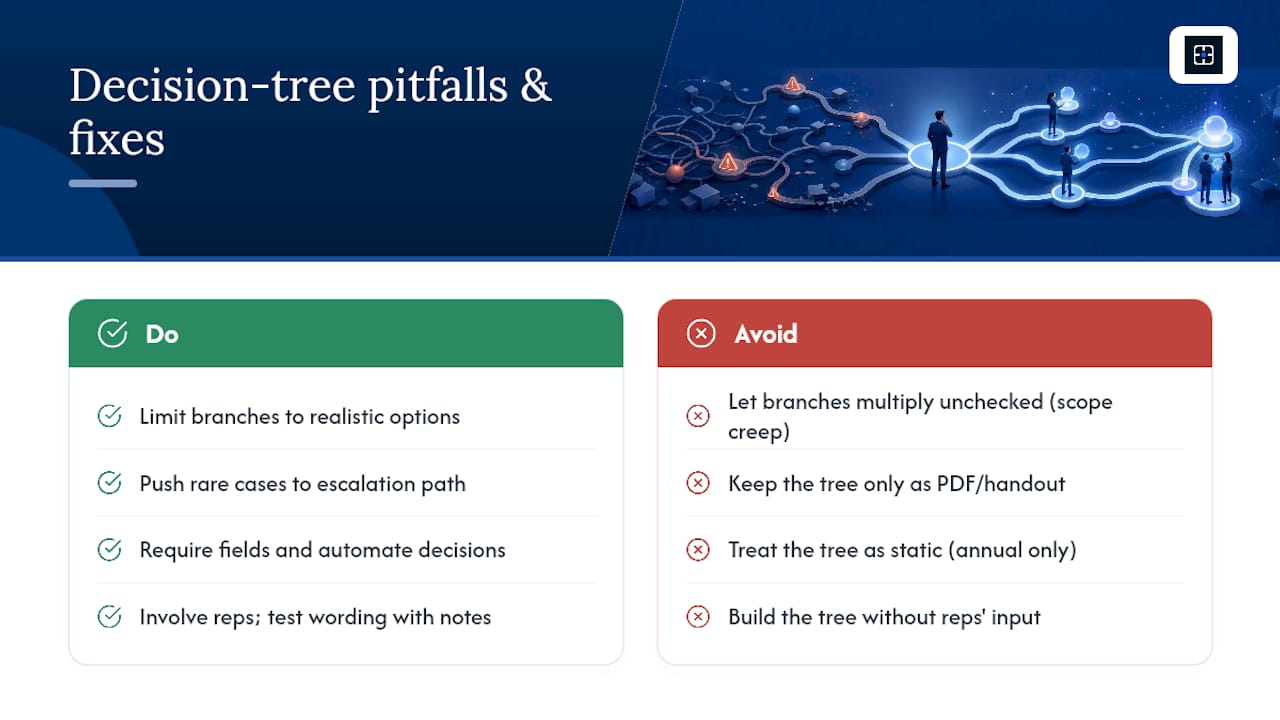
The most common failure is scope creep. A tree that starts with three branches per node grows to six, then eight, as managers try to account for every edge case. At that point reps stop using it, because checking a tree takes longer than trusting their own instinct. The fix is discipline: limit branches to operationally realistic options and push rare exceptions into a manager escalation path instead of a new branch.
A second pitfall is building the tree without CRM enforcement. A tree that exists as a PDF or a laminated card gets used for a week and then forgotten. Without required fields and automation tied to each decision point, the tree becomes documentation rather than process.
A third pitfall is treating the tree as static. Objections shift as competitors change pricing or the market moves, and a tree built two years ago for a different product tier will steer reps toward stale responses. Teams that revisit their tree only during an annual planning cycle tend to find that half the branches no longer match what prospects actually say.
Finally, some managers build the tree without involving reps who work the phones daily. A tree drafted entirely by leadership tends to miss the messy, real phrasing of objections, and reps quietly route around it in favour of their own habits. Building it collaboratively, testing the wording of each branch against real call notes, produces a tree people actually trust, which is consistent with guidance that decision trees work best as a collaborative exercise rather than a top-down mandate.
Case studies: decision trees across different sales environments
A SaaS sales team selling to mid-market finance buyers found that price objections clustered heavily around one specific competitor’s aggressive discounting. Once that pattern was mapped as its own branch, with a scripted reframe around total cost of ownership rather than list price, reps stopped defaulting to matching the discount and instead moved the conversation toward a scoped pilot.
In a manufacturing equipment sales context, timing objections dominated because purchase decisions were tied to annual capital budget cycles. Mapping the root question around “is this in the current capital plan or the next one?” let reps separate genuine year-long delays from soft stalls that a smaller commitment, a paid assessment or a deposit, could unlock immediately.
A professional services firm selling retainer-based consulting used a fit branch heavily, because prospects frequently confused their offering with a narrower point solution. Scripting a specific set of use-case questions at that branch cut the average discovery call length while improving the accuracy of proposals that followed, since reps stopped guessing at scope.
None of these examples required exotic technology. Each used the same underlying structure: a measurable root question, a small number of realistic branches, and a scripted response tied to a CRM field. The industries differ. The discipline of forcing every branch to end in a defined next step does not.
Which tools work best for building a sales decision tree?
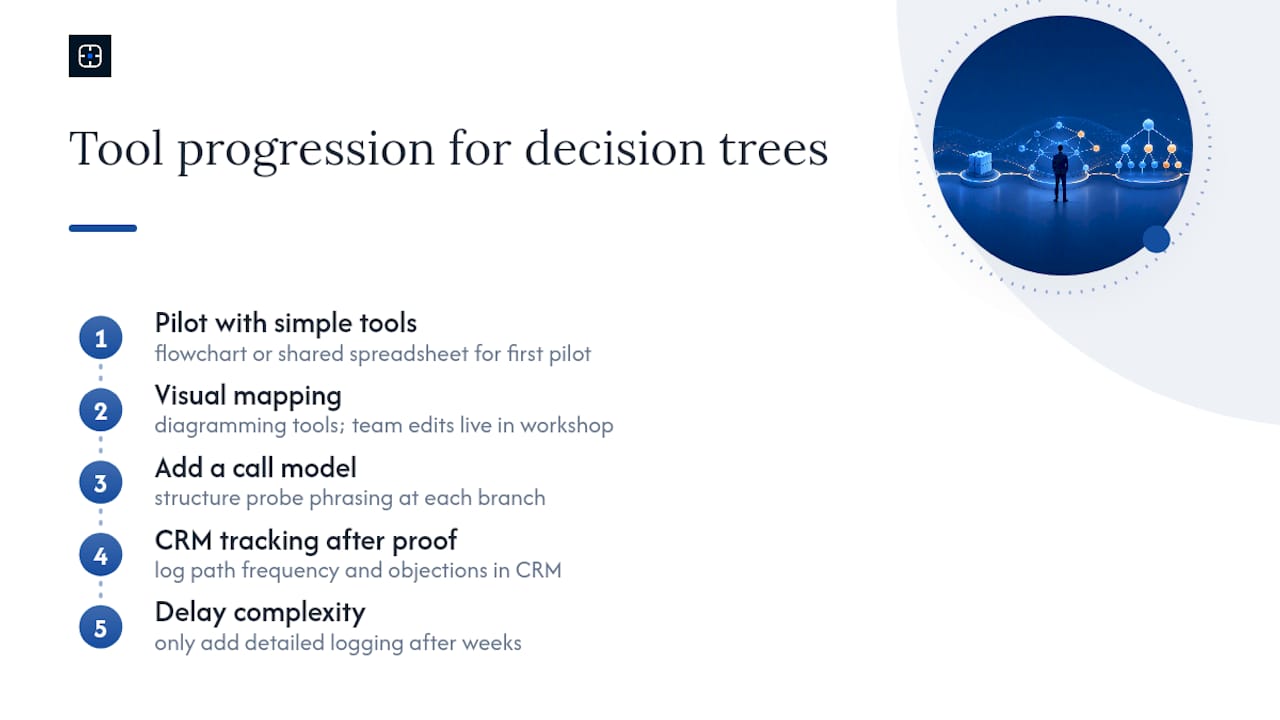
You do not need enterprise software to get started, and most teams overbuild the tooling before they have proven the tree itself works. A basic flowchart tool or a shared spreadsheet is enough for a first pilot, and starting with simple tools before investing in specialised software is sound advice for any team testing a new process.
For visual mapping, general-purpose diagramming tools handle the branch structure well and let a whole team edit it live during a workshop. For instrumented tracking, once the tree is proven, path frequency and objection data belong in the CRM itself, as custom fields or a connected reporting dashboard, rather than in a static document.
Some teams also build a simple call model to structure how reps phrase probe questions at each branch, which is a useful complement to the tree itself rather than a replacement for it. Reference examples of structured call models show how decision logic and call scripting reinforce each other when reps are learning a new framework.
Whatever tool you choose, resist the urge to add tracking complexity before the tree has been tested on real calls for a few weeks. A tool that logs every branch outcome is only useful once you know the branches themselves are the right ones. Recording actual outcomes against each decision path, rather than trusting memory or anecdote, is the same discipline behind systems built to log decisions and their results so teams can learn from the pattern rather than the anecdote.
How do you train reps to use a decision tree in real conversations?
Training on a tree fails when it stays theoretical. Reps need to hear the branches spoken aloud in a realistic voice before they will use them on a live call. Role-play is the single most effective method: pair reps and run through each objection branch as a scripted exchange, then swap roles so every rep has said the response out loud at least once before facing a real prospect.
Tie the rollout to a specific, small sales motion first, one product line or one segment, rather than the whole team at once. Piloting on a single motion and capturing path frequency data before a wider rollout gives you real usage evidence to refine the wording before it becomes company-wide habit.
Gate the rollout with a short certification: a rep should be able to walk a manager through each branch of the tree from memory before working it into live calls unsupervised. This is not bureaucracy for its own sake. It catches the reps who nod along in training but revert to old habits on the phone.
Finally, review actual call recordings or notes against the tree monthly. If reps are consistently skipping a branch or rewording a response in a way that changes its meaning, that is a signal the tree’s wording needs revision, not that the rep needs correcting.
When decision trees are worth the investment
Trees earn their keep in complex, multi-stakeholder sales where objections repeat predictably: mid-market SaaS, manufacturing equipment, professional services. They are overkill for simple transactional sales with one buyer and a short cycle. Roll out with a pilot, CRM enforcement and role-play before wider adoption, and treat the tree as a decision aid. It structures judgement. It does not replace it.
— Brian
Turning objection logic into a forecast you can defend
A decision tree standardises how reps handle objections. It does not, by itself, tell you whether the pipeline behind those conversations is honest. That is a separate problem, and it is the one Commitcontrol was built to solve. Most forecasting tools rely on probabilistic models that produce a score without showing the reasoning behind it, which makes the number hard to defend when a board asks why a deal is rated 70% rather than 50%.

Commitcontrol takes a different approach: deterministic scoring built directly from your Salesforce data, where the same inputs always produce the same score, and every signal behind that score is traceable back to a field a rep or manager actually touched. There is no model to trust blindly. There is a calculation you can walk through line by line in a forecast review, with a human still owning the final call on every deal. If your team has mapped objection branches and started enforcing exit criteria in the CRM, that structured data is exactly what makes a deterministic score meaningful rather than arbitrary.
See what a missed forecast actually costs your business with the Sales Forecast Miss ROI Calculator, or book a walkthrough of the platform at Commitcontrol.
Sources
- How to create and use a business decision tree
- Decision tree guidance for teams
- B2B sales process flowchart: 2026 pipeline template
- How to use decision trees to turn common sales objections into opportunities
FAQ
Can you give an example of a sales decision tree?
A simple example starts with the root question “does the prospect have confirmed budget?” Branches split into yes and no, each leading to different probe questions, objection responses and next-step actions logged in the CRM.
What is the difference between a decision tree and XGBoost?
A decision tree is a single, transparent branching structure you can read step by step, while XGBoost combines many trees into a statistical model whose combined logic is far harder to trace back to one input. Sales teams generally want the single-tree approach because every branch and outcome stays traceable and explainable.
Can you explain a decision tree simply?
It is a flowchart of choices and likely outcomes: each branch point represents a decision or an uncertain event, and each end point represents a result, whether that is a closed deal or a disqualified lead.
What are the five steps of decision tree analysis?
The standard sequence is: define the decision, map the available choices, chart the uncertain or chance outcomes, quantify the probability and value of each outcome, and calculate expected value to compare paths.
Do sales decision trees work with existing CRM systems like Salesforce?
Yes. Branches translate into required fields and automated triggers, and platforms such as Commitcontrol build directly on that Salesforce data to score pipeline risk in a way that stays traceable to the same fields your tree already enforces.
Recommended
Editorial content. All metrics are Salesforce-derived and reviewed for accuracy. Not a substitute for professional judgment.
See the same discipline applied to your pipeline.
CommitControl derives every figure from your own Salesforce data. Nothing is invented, and every number traces back to the record it came from. Connect Salesforce and the same view runs live on your data within 24 hours.
Evaluate CommitControl