Commit is the amount you will stand behind for this forecast period; pipeline is the wider set of open opportunities you draw from for coverage and upside. Defend the commit number with evidence from your CRM, not with confidence alone. Before your next forecast call, inspect stage mappings and the evidence trail behind every material deal.
TL;DR:
- Confirm which stages automatically roll into the commit forecast category and verify if any deals have been manually overridden with forecast categories.
- Review recent activity logs, contact dates, and supporting evidence for deals marked as commit, especially before the forecast call.
- Prioritize large deals that could break the forecast if lost, and assess clusters from the same account or sector for concentration risk.
- Record clear, brief decisions and supporting evidence for each material deal to ensure forecast credibility and easy review.
- Use read-only tools to rank exposure and review evidence quickly, supporting objective judgments over assumptions during forecast discussions.
Table of Contents
- Definitions: how Salesforce represents commit and pipeline
- Quick guide: what to check in Salesforce when inspecting pipeline quality
- How to prioritise material opportunities for a forecast call
- Running weekly reviews and recording the judgment behind forecast calls
- Common pitfalls and red flags that undermine commit credibility
- Balancing data and judgement during forecasts
- How CommitControl helps: read-only Salesforce evidence, ranked exposure and locked calls
- Authoritative documentation and benchmarking reports
- Sources
- FAQ
Definitions: how Salesforce represents commit and pipeline
Commit is the subset of opportunities a leader is willing to defend as closing this period. Pipeline is everything else in motion, the full set of open opportunities across stages, used for coverage ratios and to identify upside beyond commit.
Salesforce derives forecast categories, Pipeline, Best Case, Commit, Closed, Omitted, from the Opportunity Stage field, and these mappings can be edited. In Lightning Experience, users can override the default category on an individual opportunity, which means a rep’s judgement can move a deal into Commit regardless of what the stage would normally suggest. The underlying data structure sits in the ForecastingItem object, which stores forecast category fields and rollup types used in reporting.
Before your next review, check three things:
- Confirm which stages roll into Commit by default in your org.
- Identify how many open deals currently carry a manual forecast category override.
- Note whether reps and managers share the same understanding of what each stage means.
Quick guide: what to check in Salesforce when inspecting pipeline quality
Fifteen minutes before a forecast call is not enough time to read every opportunity. Run this order instead.
- Check recent stage changes and whether each change came with supporting activity, not just a field update.
- Review the activity trail: last contact date, logged calls or emails, and a stated next step with a date attached.
- Confirm the close date is plausible against the sales cycle and that the amount reflects the actual scope discussed.
- Verify the opportunity owner and check that a decision-maker contact is recorded, not just a general champion.
- For any deal claimed at commit level, ask for the evidence behind it. If none exists, log the gap and follow up before the call.
Salesforce’s Pipeline Inspection gives a consolidated view of pipeline metrics, week-to-week changes and activity insight, which is the fastest way to spot deals that moved stage without any supporting activity behind the change.
Pro Tip: Sort by “days in stage” before you sort by amount. A large deal that has not moved in three weeks tells you more than a large deal that just closed a stage.
How to prioritise material opportunities for a forecast call
Not every open deal deserves airtime on a forecast call. Materiality is a function of size and concentration, not just size alone.
- Flag any single opportunity large enough that its loss alone would break the commit target.
- Flag any small cluster of deals from the same account or sector that creates concentration risk if that segment slows.
- Sort deals into defend, monitor or remove based on evidence strength and recent movement, not on the owner’s confidence.
- Ask deal owners direct questions: who confirmed the close date, what happens if the buyer’s budget is not approved this quarter, and what evidence supports the stage.
A deal that survives those questions with clear answers earns its place in commit. A deal that survives only on optimism belongs in pipeline until the evidence catches up.
Running weekly reviews and recording the judgment behind forecast calls
A workable weekly rhythm has four steps: inspect the data before the meeting, let owners give brief commentary on what changed, have the leader make a locked call on each material deal, and check the following week whether that call held up.
Record each locked call in a consistent, minimal format:
- The decision: in commit, in pipeline, or removed.
- The evidence cited to support that decision.
- A confidence level, stated plainly rather than implied.
- The next step and who owns it before the following review.
Xactly’s benchmarking work on sales forecasting finds that regular pipeline inspection and historical benchmarking improve forecast accuracy, and that many leaders see better tooling and more frequent data delivery as the fix for missed forecasts. Software can rank exposure and surface evidence, but the leader still makes the call. Signals inform judgement; they do not replace it.
Pro Tip: Keep the locked-call record short enough to read in ten seconds. A record nobody rereads before the next review is not worth keeping.
Common pitfalls and red flags that undermine commit credibility
Most forecast misses trace back to a small set of repeatable mistakes: stale activity on a deal still marked Commit, a close date pushed forward without any change in evidence, a forecast category overridden by one person with no note attached, and a commit call made by a single rep with no leader challenge.
- Treat stale activity or an unexplained override as a reason to move a deal back to pipeline until it is re-evidenced.
- Require a second opinion or supporting note before any override stands at commit level.
- Compare current deals against how similar opportunities moved historically to judge whether an in-quarter close is realistic.
Balancing data and judgement during forecasts
Sellers have every incentive to keep a deal in commit, and leaders have every incentive to want the number to hold. That tension does not resolve by trusting either side blindly.
The fix is not more fields for reps to fill in. It is a habit of asking for evidence, keeping a record of what was said and why, and checking it against what actually happened. Receipts do more for coaching than a scolding ever will, because they show a pattern rather than a single miss.
Judgement stays with the leader. Evidence just makes that judgement easier to defend and easier to hand over when the seat changes hands.
— Brian
How CommitControl helps: read-only Salesforce evidence, ranked exposure and locked calls
Preparing a forecast call from scratch every week is repeatable work that rarely gets easier as a team grows. Some platforms read Salesforce data on a permitted, read-only basis, rank material exposure, and show the supporting evidence behind each flagged deal, so the checklist above can take minutes instead of an afternoon. Owners can record decisions and notes directly against each opportunity, and review earlier risk signals against how deals actually closed. This process requires no rep login or new data entry routine.
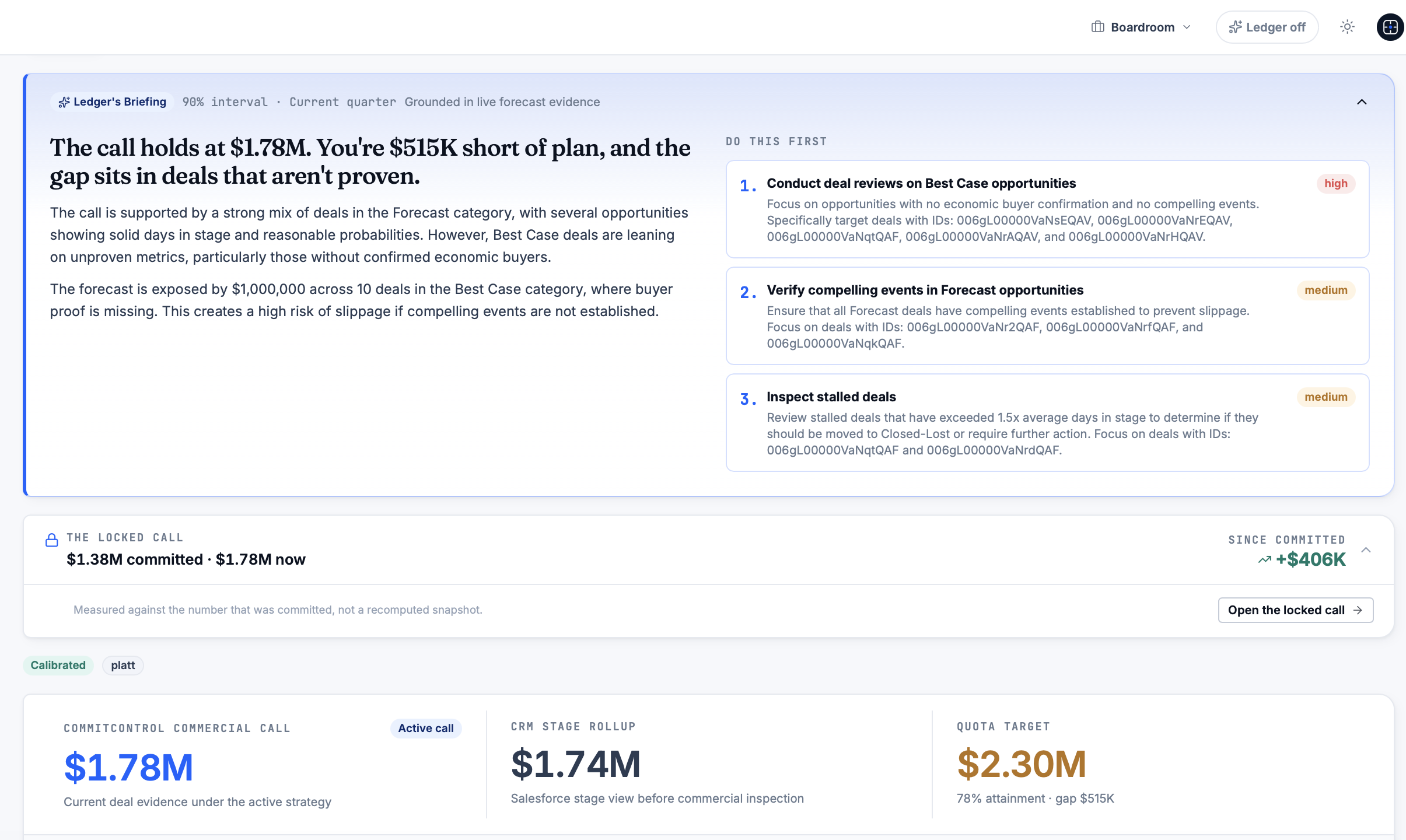
- See how ranking and evidence work on the product overview.
- Compare plans, Insight, Command, Executive and Enterprise, on the pricing page.
- Check data residency and GDPR details on the security page.
If you are stepping into an inherited book, our sales leadership transition guide covers resetting a forecast from a standing start. Readers assembling a fuller evidence pack for bid decisions may also find BidBlock useful alongside this. Book a demo-tenant forecast review to see your own pipeline ranked before you decide anything.
Authoritative documentation and benchmarking reports
For further reading: Salesforce’s stage-to-forecast mapping guidance and Pipeline Inspection documentation; Xactly’s sales forecasting benchmark report; and Gartner’s survey findings on forecasting confidence.
Sources
- Manage Opportunity Stage to Forecast Category Mappings for Pipeline Forecasts | Salesforce Help
- Forecasting (Xactly sales forecasting benchmark report)
- ForecastingItem | Object Reference for the Salesforce Platform | Salesforce Developers
FAQ
What is the difference between commit and pipeline in sales forecasting?
Commit is the subset of opportunities a leader will defend as closing within the current period, while pipeline is the broader set of open deals across every stage. Leaders use pipeline for coverage and upside planning and reserve commit for deals backed by clear evidence.
What does “commit vs upside” mean on a forecast call?
Upside refers to deals that could close in the period but do not yet have enough evidence to sit in commit. A deal moves from upside to commit once activity, a confirmed close date and a decision-maker contact support the claim.
How does Salesforce decide which forecast category a deal falls into?
Salesforce maps Opportunity Stage to a forecast category by default, and users can edit that mapping or override the category on an individual deal in Lightning Experience. This means the category shown is not always automatic and should be checked against the stage and the supporting evidence.
How often should a sales leader run a pipeline review?
A weekly rhythm works well: inspect the data before the meeting, gather brief owner commentary, make a locked call on material deals, and check the following week how those calls held up. This matches the regular inspection habit that Xactly’s benchmarking work associates with better forecast accuracy.
What evidence should a leader show on a forecast call?
Show the activity trail behind each material deal: recent stage changes, logged contact with a decision-maker, a plausible close date and any note explaining a forecast category override. CommitControl’s Locked Calls and Receipts are built to keep that evidence trail ready ahead of the call.
Recommended
Editorial content. All metrics are Salesforce-derived and reviewed for accuracy. Not a substitute for professional judgment.
See the same discipline applied to your pipeline.
CommitControl derives every figure from your own Salesforce data. Nothing is invented, and every number traces back to the record it came from. Connect Salesforce and the same view runs live on your data within 24 hours.
Evaluate CommitControl